comark-annotate
Mark up screenshots in Markdown with hand-drawn marks, numbered notes, arrows, and before/after comparisons.
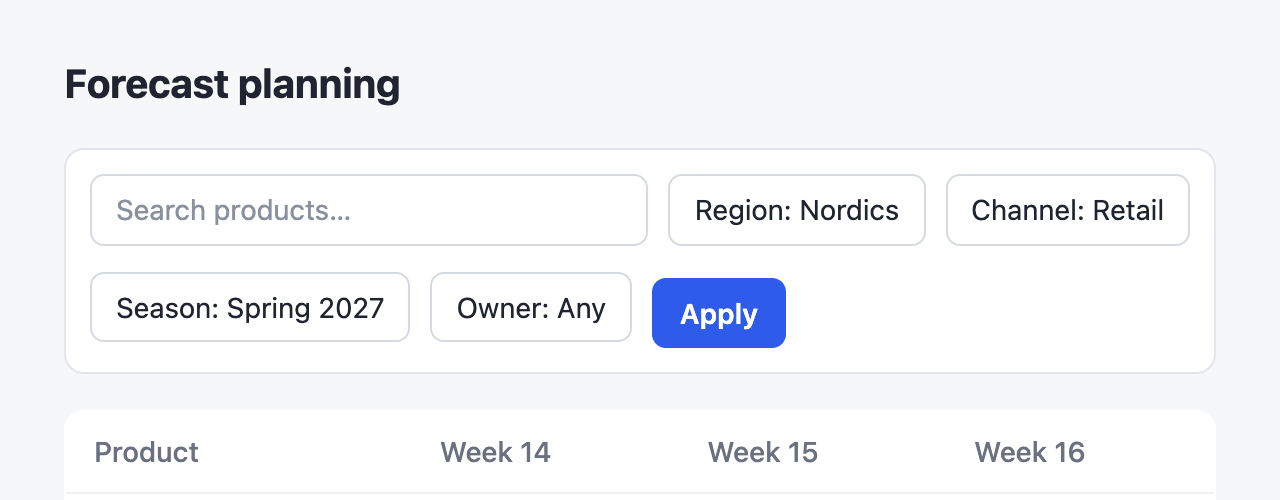 12
12- 1Five filters don't fit, so the toolbar wraps and pushes the table down.
- 2Apply sits 6px lower than the chips.
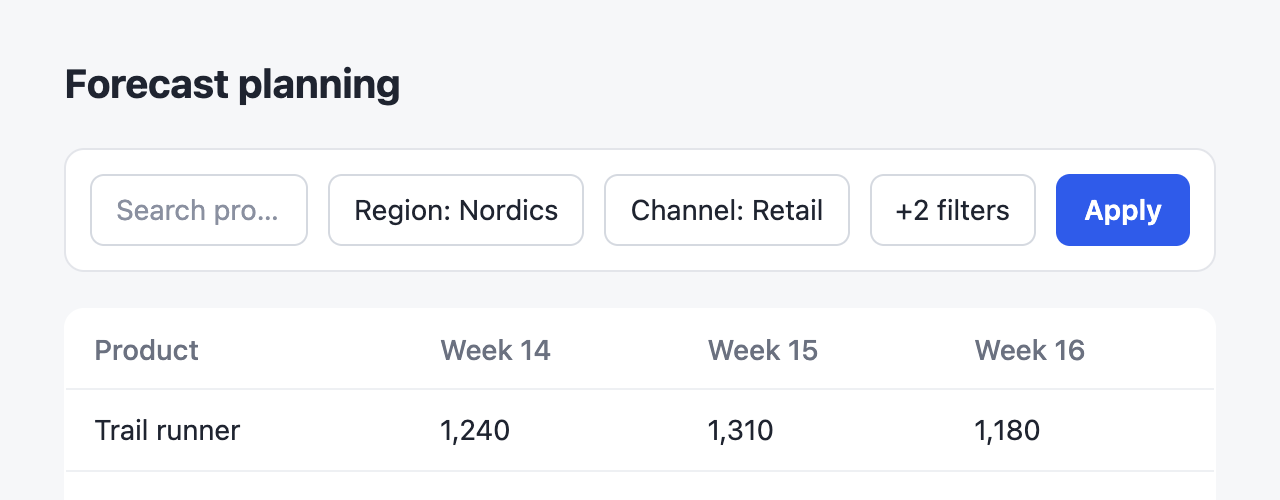 34
34- 3Extra filters collapse into +2 filters.
- 4Apply lines up with the chips.
::compare
:::screenshot{src="/before.png" alt="Filter toolbar wrapping onto a second row" viewport="640x250"}
::::annotation{x=5 y=29.6 w=90 h=45.3 color="red"}
Five filters don't fit, so the toolbar wraps and pushes the table down.
::::

::::annotation{x=50.9 y=55.4 w=10.5 h=14.2 mark="circle" color="red"}
**Apply** sits 6px lower than the chips.
::::
:::

:::screenshot{src="/after.png" alt="Filter toolbar on one row" viewport="640x250"}
::::annotation{x=67.9 y=34.8 w=13 h=14.2 mark="highlight" color="blue"}
Extra filters collapse into **+2 filters**.
::::

::::annotation{x=82.5 y=34.8 w=10.5 h=14.2 mark="check" color="green"}
**Apply** lines up with the chips.
::::
:::
::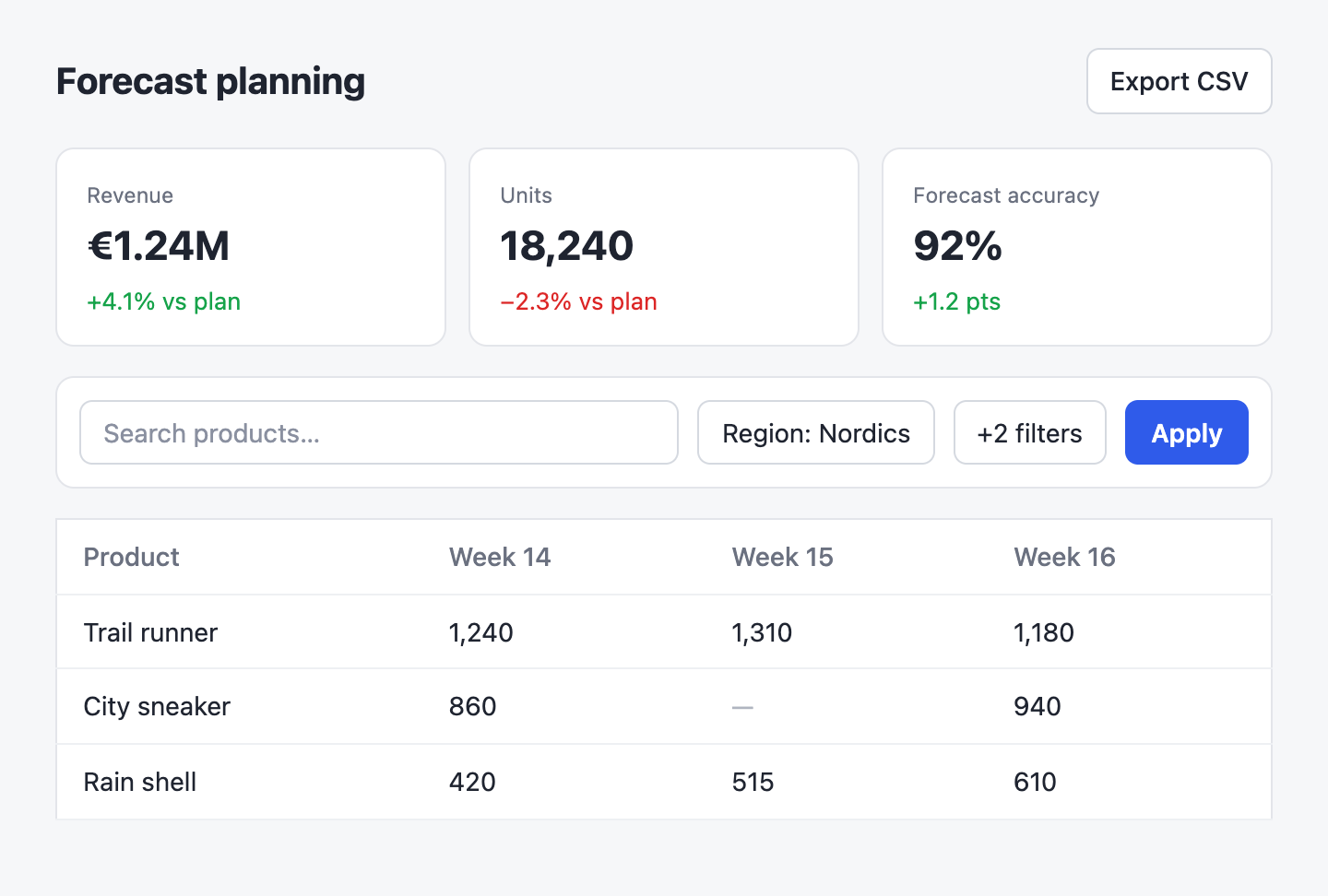 ABC
ABC::screenshot{src="/dashboard.png" alt="Forecast planning dashboard"}
:::annotation{x=37.6 y=31.9 w=11.9 h=3.3 mark="none" side="top"}
Units fell below plan.
:::
:::annotation{x=66.4 y=16.4 w=29.4 h=22.2 mark="none" side="top"}
Accuracy now counts returns.
:::
:::annotation{x=53.1 y=74.7 w=21.2 h=8.4 mark="none" side="left"}
Week 15 never loaded.
:::
::- 1Notes without a
sidestay in the list. Apply waits until every filter is set.
::screenshot{src="/dashboard.png" alt="Forecast planning dashboard"}
:::annotation{x=37.6 y=31.9 w=11.9 h=3.3 mark="underline" side="left" color="red"}
Units fall below plan for the first time this quarter.
:::

:::annotation{x=66.4 y=16.4 w=29.4 h=22.2 side="right"}
Accuracy now counts returns.
:::

:::annotation{x=53.1 y=74.7 w=21.2 h=8.4 mark="highlight" side="left" color="amber"}
Week 15 is missing for City sneaker.
:::

:::annotation{x=84.7 y=44.6 w=9.3 h=7.3 mark="circle"}
Notes without a `side` stay in the list. **Apply** waits until every filter is set.
:::
::- 1
boxframes an element. - 2
circlerings a small detail. - 3
underlinemarks text. - 4
highlightwashes over an area. - 5
crossstrikes something out. - 6
checkapproves and sits beside its target.
::screenshot{src="/dashboard.png" alt="Forecast planning dashboard"}
:::annotation{x=81.8 y=5.3 w=14.1 h=7.3}
`box` frames an element.
:::

:::annotation{x=37.6 y=31.9 w=11.9 h=3.3 mark="circle"}
`circle` rings a small detail.
:::

:::annotation{x=4.2 y=6.1 w=23.4 h=5.8 mark="underline" color="blue"}
`underline` marks text.
:::

:::annotation{x=53.1 y=74.7 w=21.2 h=8.4 mark="highlight" color="amber"}
`highlight` washes over an area.
:::

:::annotation{x=6 y=44.6 w=45.2 h=7.3 mark="cross" color="red"}
`cross` strikes something out.
:::

:::annotation{x=84.7 y=44.6 w=9.3 h=7.3 mark="check" color="green"}
`check` approves and sits beside its target.
:::
::
Hover a mark or a note to highlight the other, and click a screenshot to zoom it. A comparison shows its screenshots side by side, or one at a time on a narrow page, and they zoom as one gallery. The page reads the same without a script; zoom and carousel come with the package.
Usage
Register the plugin and pass the HTML renderers as components:
import { createHtmlRenderer } from "@comark/html";
import annotate, { components } from "comark-annotate/html";

const render = createHtmlRenderer({ plugins: [annotate()], components });
const html = await render(markdown);
The renderer inlines its styles once per document and scopes them under .ca with zero specificity, so a plain .ca { --ca-color: #0070f3; --ca-ink: #fff } changes the default mark and stamp colors. Side notes and labels use --ca-note-font; this page sets it to Caveat for the handwritten look. Positions use style attributes, so a strict CSP needs style-src 'unsafe-inline'. Notes are ordinary Markdown, so raw HTML in them renders like anywhere else in the document; for untrusted input, add Comark's security plugin, which also cleans notes.
Components
screenshot
An image with marks on it. Other content inside the block becomes the caption.
1- 1Extra filters collapse into +2 filters.
::screenshot{src="/after.png" alt="Filter toolbar on one row" label="After" url="https://pr42.preview.example.com/plan"}
:::annotation{x=67.9 y=34.8 w=13 h=14.2}
Extra filters collapse into **+2 filters**.
:::
::| Prop | |
|---|---|
src |
Image URL. Required. |
alt |
What the screenshot shows. Required. |
label |
Heading above the notes. |
url |
The page you captured, shown as a link. |
viewport |
Capture size, like 1440x900. A compare checks that both sides match. |
annotation
A mark on the screenshot and its note. The content is the note. Props can be inline, in a YAML props block, or bound with :x. Notes in the list under the image are numbered. Side notes sit beside or above the image and point with an arrow instead.
1A- 1Export CSV includes the filters you set.
::screenshot{src="/dashboard.png" alt="Forecast planning dashboard"}
:::annotation{x=81.8 y=5.3 w=14.1 h=7.3 color="blue"}
**Export CSV** includes the filters you set.
:::

:::annotation{x=66.4 y=16.4 w=29.4 h=22.2 side="right" color="green"}
Accuracy now counts returns.
:::
::| Prop | |
|---|---|
x y w h |
The marked area, as percentages of the image from 0 to 100. |
mark |
box (default), circle, underline, highlight, cross, check, or none to let an arrow do the pointing. |
side |
left, right, or top puts the note beside or above the image with an arrow. |
color |
blue (default) points something out, red flags a problem, amber a warning, green a fix, gray anything neutral. Each has a dark-mode value. Any hex color like #e11d48 works too. |
compare
Two screenshots side by side, labelled Before and After unless they set their own label. Numbers continue from one side to the other, and the pair stacks on narrow screens.
1- 1Apply sits lower than the chips.
2- 2Fixed.
::compare
:::screenshot{src="/before.png" alt="Toolbar wrapping" viewport="640x250"}
::::annotation{x=50.9 y=55.4 w=10.5 h=14.2 mark="circle" color="red"}
**Apply** sits lower than the chips.
::::
:::

:::screenshot{src="/after.png" alt="Toolbar on one row" viewport="640x250"}
::::annotation{x=82.5 y=34.8 w=10.5 h=14.2 mark="check" color="green"}
Fixed.
::::
:::
::
Guides
Side notes
side="left", side="right", or side="top" moves a note out of the list and next to or above the image, with a hand-drawn arrow to its mark. Pair it with mark="none" to point without drawing a box. Side notes have no number because the arrow links them. On narrow screens they drop under the image, the arrows hide, and each note and its target get a matching letter.
Notes on the same side need room. The plugin reports side notes whose marks sit close together vertically, since they would likely overlap. It can't measure the text, so check the rendered page too, and move one note to the other side or into the list.
Placing marks
Measure the element in the page you captured and divide by the viewport. Don't estimate from the image.
const r = element.getBoundingClientRect();
const box = {
  x: (r.x / innerWidth) * 100,
  y: (r.y / innerHeight) * 100,
  w: (r.width / innerWidth) * 100,
  h: (r.height / innerHeight) * 100,
};
For a full-page screenshot, add the scroll offset and divide by the page size instead.
Validation
The plugin checks every block while parsing and lists the problems in meta.annotateIssues, so you can reject a document before publishing it.
import { parseMarkdown } from "comark";
import annotate from "comark-annotate";

const { meta } = await parseMarkdown(markdown, { plugins: [annotate()] });
if (meta.annotateIssues.length) throw new Error(meta.annotateIssues.join("\n"));
Each issue names its block and says how to fix it:
screenshot "after.png", annotation 2: the box runs past the image edge (x + w and y + h must stay within 100).Rendering never throws.
Agents
The package ships an agent skill with the syntax, how to measure marks from the page, and how to check the result. Install it from this site:
npx skills add https://comark.onmax.meIt also comes with a small CLI. check lists every problem and exits with 1 if there are any; render writes a standalone page you can open and screenshot to confirm each mark sits on its target.
npx comark-annotate check report.md
npx comark-annotate render report.md -o report.html
Credits
Comark, by the Comark team, does the hard part: the parser, the component syntax, and the HTML renderer this plugin builds on. The hand-drawn marks come from AnnotationKit.